Run your school.
Not the paperwork.
EduRit unifies student management, attendance, grades, fees, and communication — giving every school stakeholder a personalized, role-based experience.
- ✓Free 14-day trial
- ✓No credit card required
- ✓Guided setup checklist
EduRit · Principal dashboard
Monday, 9 February
Good morning, Mrs. Sharma
Students
2,847
Teachers
183
Attendance
94.2%
Fees collected
₹1.24Cr
Attendance this week
Today
- Staff meeting2:30 pm
- Unit test · Gr 8P3
- PTM · Class 84:00 pm
Illustrative screens with sample data. Names, schools, and figures are fictional.
- Sections in one dashboard
- 18
- Built-in roles, plus your own
- 6
- Free trial, every module
- 14-day
Every hour of the school day, handled.
Follow one ordinary school day — and everything that no longer needs a register, a ledger, or a phone call.
- 08:05
The register is done before the bell stops ringing.
Ms. Desai marks Class 7-B from her phone in one go. The office sees the section ticked off in the daily summary straight away.
Class 7-B · Daily register28 / 30Saved at 8:06 am · 2 absent
- 10:30
Marks go in once. Everything else updates itself.
Unit-test scores become the result, the report card, and the parent's view, with rank and class average worked out. No re-typing, no spreadsheet at term-end.
Maths · Unit test 3
Amara F.92Rohan B.78Sara I.88Devansh R.95Report cards updated
- 12:15
One notice. Every parent.
The Sports Day notice is posted once and arrives as a notification on every parent's phone.
Notice · Event · Annual Sports Day
Sports Day is on Saturday. Students report by 7:30 am in house T-shirts.
AudienceParents · all classesPosted12:15 pm - 14:00
A fee paid at the counter. The receipt is ready to print.
Mr. Rao pays Term 3 by UPI at the office. The accountant records it, prints the receipt, and his balance updates in the parent view.
Payment receiptPaid₹8,400
Devansh Rao · Term 3 · UPI
Receipt #ER-20417 · ready to print - 16:30
The principal sees the whole day on one screen.
Attendance, collections, and what's waiting for approval, without chasing a single report.
Today at a glance
94.2%
Attendance
₹3.2L
Collected
4
Approvals
One platform. The whole school office.
From the first admission enquiry to the transfer certificate, the core of school administration in one system.
96%
Attendance
A1
Term grade
Paid
Fees
Student Management
Every student's profile, guardians, class, and status in one place, from admission through to transfer certificate.
94.2%
present today
Attendance Tracking
Mark a register in one go, daily or lecture by lecture, see the summary across classes, and let class teachers handle leave requests.
Exams & Report Cards
Schedule exams, enter marks once, and get results with rank, class average, and pass percentage, then print report cards.
Collected this term
82%
of invoiced fees · 14 defaulters
Fee Management
Fee structures, bulk invoices, online payment by parents, receipts for every payment, fee reminders, refunds, and a defaulters list that keeps itself current.
No teacher clashes
Timetable
Build each section's weekly timetable, with elective subjects side by side in one period. EduRit warns you before a teacher is booked into two classes at once.
Dashboard & Reports
Today's attendance, fee collection, pending approvals, and a six-month attendance trend, the moment you sign in.
Also included: the whole school office.
Admissions, transport, library, HR, and the front desk, all on the same student and staff records.
- Teacher–parent messagesTeacher–parent chat without sharing phone numbers
- LibraryIssue and return books, with late fines calculated automatically
- Admissions pipelineFrom first enquiry to admission, with an online form
- Certificates and ID cardsTransfer, Bonafide, and Character certificates, plus ID cards
- HR and payrollLeave, staff attendance, appraisals, and payroll
- TransportRoutes, seat occupancy, and vehicle document expiry alerts
- Front officeVisitors, gate pickup, infirmary, inventory, and compliance due dates
- Board supportUDISE+ and CBSE registration sheets from your student records
The core school workflows, in one system
Pick a part of the school day. The screen you see is the same connected record underneath.
Marks in once. Results and report cards follow.
Plan an exam and its schedule, enter subject marks, and EduRit works out each student's grade, rank, and the class average and pass percentage. Report cards are generated from the same marks and printed for a whole section at once.
- ✓Exam schedules, marks entry, and published results
- ✓CBSE-style grades (A1 to E), rank, average, and pass %
- ✓Report cards with remarks, printed section by section
1 entry
becomes the result, the report card, and the student's view
Exams & Marks · Class 7-B · Results
Half-yearly results
Class average 81.9% · Pass 100%
| Student | Maths | Science | English | Social | Grade |
|---|---|---|---|---|---|
| AFAmara Fernandes | 92 | 88 | 95 | 90 | A1 |
| RBRohan Bhatt | 78 | 84 | 72 | 80 | B1 |
| SISara Iyer | 65 | 70 | 58 | 74 | B2 |
| DRDevansh Rao | 88 | 91 | 86 | 94 | A2 |
| MKMeher Kapoor | 81 | 76 | 90 | 85 | A2 |
Attendance without the paperwork
Mark a whole section present, absent, late, or excused from the app or a computer, once a day or lecture by lecture for classes such as 11–12. The daily summary shows which sections are done, and parents get a notification when their child is marked absent.
- ✓Daily or lecture-wise attendance, set class by class
- ✓Registers, subject-wise percentages, and an at-risk list
- ✓Leave requests approved by the class teacher
1 screen
to mark a full section's register
Attendance · Class 7-B · Monday
Class 7-B register
Daily register · Ms. Anita Desai
- 12AFAmara FernandesPAL
- 13RBRohan BhattPAL
- 14SISara IyerPAL
- 15DRDevansh RaoPAL
- 16MKMeher KapoorPAL
- 17ANArjun NairPAL
Parents see this in their own login
SubmitFee collection, without the ledger book
Set up fee structures, raise invoices for a whole class at once, and record payments at the counter by cash, UPI, cheque, or card. Every receipt, refund, and outstanding balance stays in one ledger.
- ✓Fee structures and bulk invoices by class
- ✓Printable receipts for every payment recorded
- ✓Defaulters list, refunds, and collection reports by month and method
Live
outstanding balance for every student
Fees · Term 3 collection
Collected
₹12.4L
Pending
₹3.1L
Overdue
₹0.6L
- DRDevansh RaoClass 7-B · UPI₹8,400Paid
- SISara IyerClass 7-B · —₹8,400Due
- KMKabir MehtaClass 9-A · Cash₹9,200Paid
- ADAnanya DasClass 5-C · —₹6,800Overdue
- IGIshaan GuptaClass 9-A · Card₹9,200Paid
Notices that reach the right people
Post a notice to the whole school, or only to staff, teachers, students, or parents. It appears in their dashboard and notification bell, alongside the shared academic calendar of holidays, exams, and PTMs.
- ✓Notices by audience, marked as information, alert, or event
- ✓Push notifications on the Android app, plus the in-app bell
- ✓Parents alerted to new homework, absences, and overdue fees
One post
reaches the whole school or just one audience
Notice Board · Published
- EventTo Parents · Today, 12:15 pm
Annual Sports Day
Sports Day is on Saturday, 14 Feb. Students should report by 7:30 am in house T-shirts.
- AlertTo Everyone · Yesterday, 4:13 pm
School closed tomorrow
The school will stay closed on Friday due to heavy rain.
- InfoTo Students · Mon, 9:40 am
Unit Test 1 timetable
The Unit Test 1 schedule for Classes 6–8 is on the calendar.
Timetables and admissions, handled
Build each section's weekly timetable with a warning before a teacher is double-booked, and move new admissions from first enquiry to an enrolled student without retyping the form.
- ✓Weekly timetable with a check for teacher clashes
- ✓Admissions pipeline from enquiry to admitted
- ✓Role-based access for every staff position
Clash check
before a teacher is booked into two classes at once
Timetable · Class 7-B · Week 6
Weekly timetable
0 conflictsA tailored experience for every role
Six built-in roles, each seeing only what that person needs, and custom roles for anyone else. Here are four of them.
School Admin
Run the entire school from one dashboard
- Every module, with full access
- Fee collection and defaulters
- Staff, leave, and payroll
- Roles, permissions, and audit log
- School profile and branches
Teacher
Less admin work, more time in front of the class
- Mark attendance for their class from the app
- Approve leave requests as class teacher
- Set homework with attachments and record submissions
- Enter exam marks
- Their weekly timetable and staff notices
Student
Results, homework, and timetable in one place
- Exam results
- Homework due, with a notification when it's set
- Class timetable
- Attendance record and leave status
- Library books and transport route
Parent
Stay involved, without calling the school
- Every child in one login
- A notification when a child is marked absent
- Fee invoices and what's due
- Apply for leave and get the decision
- School notices and calendar
The school day, on every parent's phone
Parents see how their child is doing without calling the school, and teachers take the register between periods.
- Android app for parents, students, and teachers
- Push notifications for absences, homework, and notices
- iPhone users and the school office use any browser
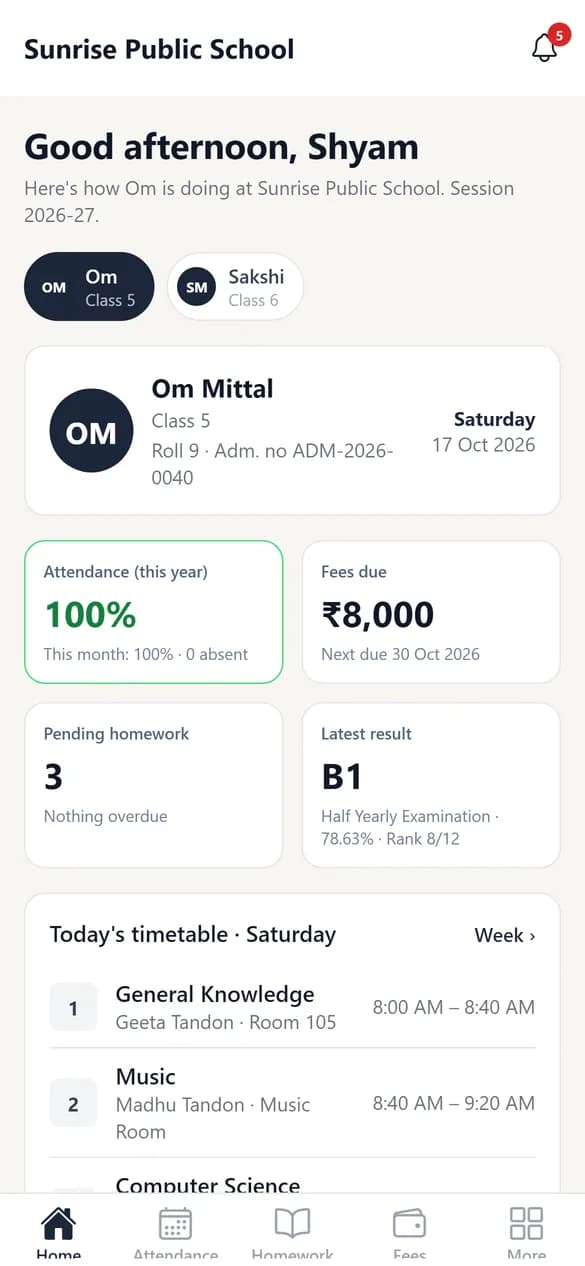
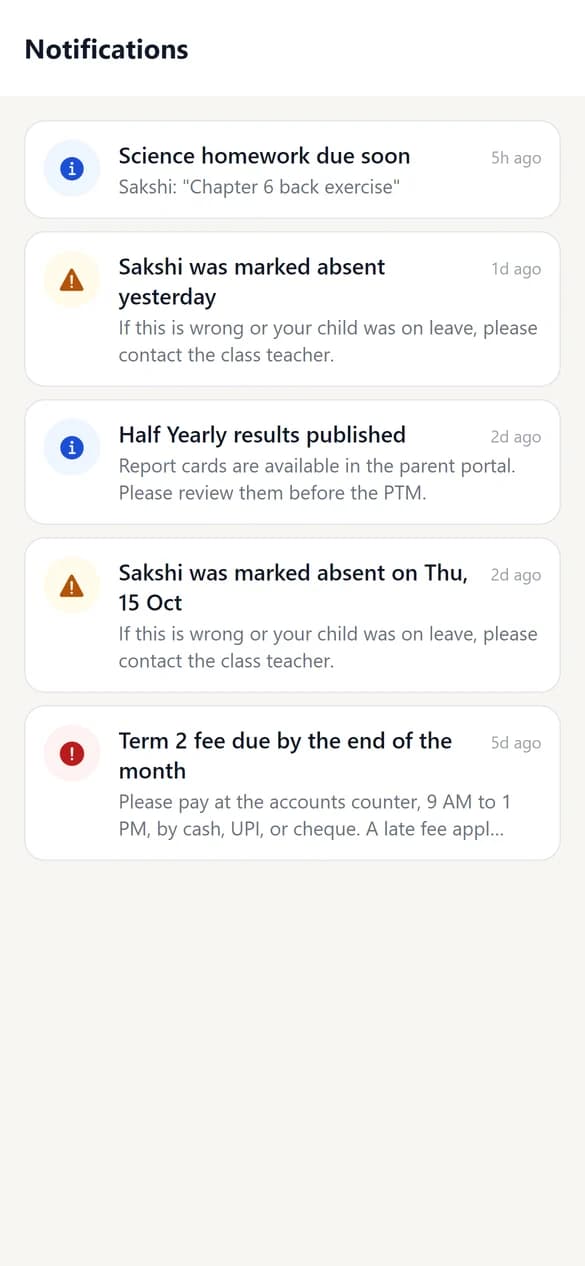
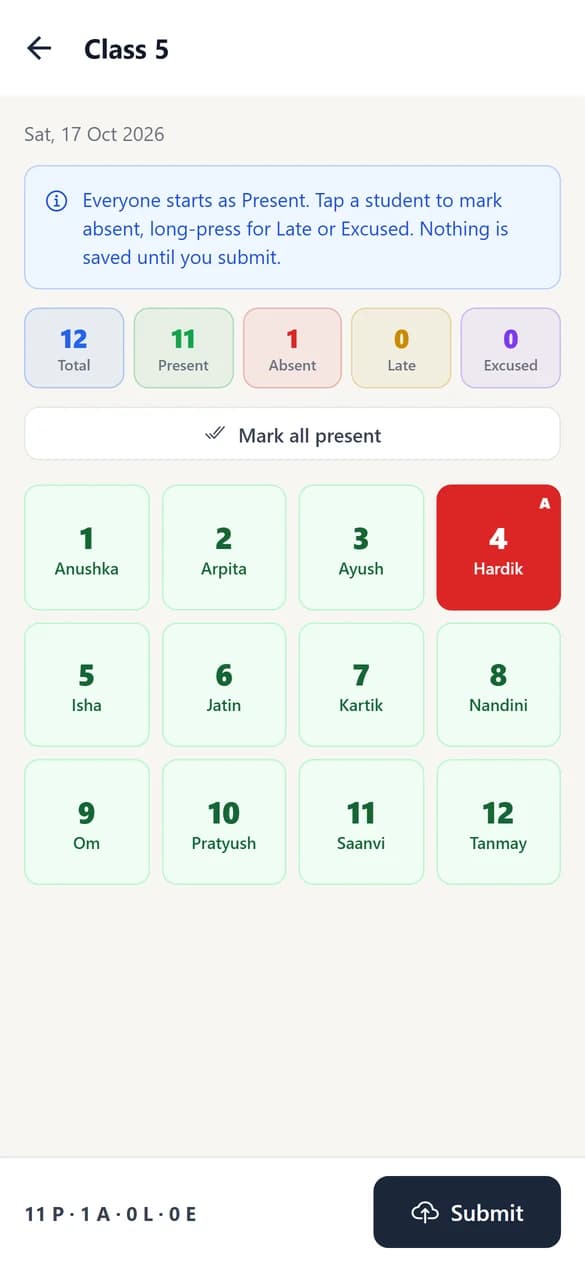
Screens from the EduRit Android app, with sample data.
Student data deserves serious care.
Simple yearly plans, sized for your school
Start with a 14-day free trial of every module. Then pick the plan that fits your school's size.
Founding school offer: the first 10 schools pay 40% less for their first 2 years. In return we ask for a short testimonial and one reference call with another school.
Basic
₹24,999/ year
Founding schools: ₹14,999 / year for 2 years
Everything a school needs every day: attendance, fees, exams, and the parent app.
Request a free trial- ✓Up to 300 students and 30 staff
- ✓Students, classes, and attendance
- ✓Fee collection, receipts, and defaulters list
- ✓Exams, marks entry, and report cards
- ✓Homework, timetables, and notices
- ✓Parent, student, and teacher app in English, Hindi, and Marathi
- ✓Excel import for students and staff
Standard
₹49,999/ year
Founding schools: ₹29,999 / year for 2 years
For growing schools that run admissions and records in EduRit.
Request a free trialEverything in Basic, plus
- ✓Up to 800 students and 80 staff
- ✓Admission enquiries and online form
- ✓Certificates and ID cards
- ✓Library catalogue and book issue
Pro
₹84,999/ year
Founding schools: ₹50,999 / year for 2 years
For larger schools that want every module in one place.
Request a free trialEverything in Standard, plus
- ✓Up to 1,500 students and 150 staff
- ✓Transport routes, stops, and vehicles
- ✓Staff payroll and appraisals
- ✓Front office: visitors, inventory, and infirmary
- ✓Help moving records from your old system
- ✓Priority support
Large schools and groups
More than 1,500 students, or several campuses?
Every Pro module for ₹55 per student a year (at least ₹90,000), several campuses in one account, on-campus setup and staff training, help moving your records, and priority support.
Every plan starts with a 14-day free trial of every module, no card needed. Prices are per school, per year, with no GST added. Setup and Excel import are free on every plan.
Compare every module, plan by plan
See our refund and cancellation policy.
Before you switch
How long does it take to set up EduRit?
A setup checklist on your dashboard takes you through the academic year, classes and sections, subjects, staff, and students. Import students and staff from Excel, and parent and student logins are created as you go. How long it takes depends mostly on how ready your Excel files are, and we can help you prepare them.
Can we bring over data from our existing system?
Yes, for students and staff. Download our Excel template, paste in your records, and EduRit checks every row before anything is saved. Our team can help you prepare the file.
Is there a free trial?
Yes. Every new school gets a 14-day free trial with every module, for up to 50 students and 10 staff. No credit card is needed. Book a demo and we'll set up your school's own EduRit address.
What if we pay and then change our mind?
Cancel within 7 days of your first payment and we refund it in full. After that, plans are non-refundable, which is why every school gets a free trial first. Plans never renew automatically. The details are in our refund and cancellation policy.
Can different roles have different levels of access?
Yes. EduRit has six built-in roles (School Administrator, Teacher, Accountant, Staff, Student, and Parent), and you can create your own, such as Vice Principal, by picking exactly which permissions it gets. Changes to records and roles are recorded in an audit log.
Can parents actually use this, or is it mainly for staff?
Parents get their own login, using their mobile number or email, to see attendance, results, homework, fees, the timetable, and school notices for each of their children, to apply for leave, and to message their child's teachers. One login covers every child at the school.
Is there a mobile app?
Yes, for Android. Parents and students see attendance, homework, results, fees, the timetable, and notices, and teachers mark attendance, set homework, enter marks, and approve leave requests from it. Teachers and parents can also message each other in the app. It sends push notifications for new messages, new notices, new homework, a child marked absent, and leave decisions. On an iPhone, and for the full office dashboard, EduRit runs in any web browser.
Do parents get SMS or WhatsApp messages?
Not at the moment. Parents are told through push notifications in the EduRit Android app and the notification bell in their login. Notices, homework, absences, and leave decisions all reach them there, without SMS charges for the school. For conversations, teachers and parents message each other inside the app, so no one shares a personal number.
Does EduRit work for Class 11–12 or a college, where attendance is taken per lecture?
Yes. Each class can take attendance once a day or lecture by lecture, so Class 1–10 can stay on a daily register while Class 11–12 marks every period. Lecture-wise classes get subject-wise attendance percentages, and elective subjects (such as Biology or Computer Science) can run in the same period, with only the students who chose them on the register and in marks entry.
Can parents pay fees online?
Yes. Parents can pay by UPI, card, or net banking from the app or their login. The money goes straight into the school's own Razorpay account; EduRit never holds it and takes no share. The receipt is created automatically, and the office can still record cash, cheque, or counter payments.
What does support look like after we go live?
Raise a ticket from the Help & Support page inside your dashboard, or email us. We usually reply within one working day, and replies come by email too.
Can EduRit handle a school with more than one campus?
Yes. One school account can hold several branches or campuses, each with its own classes and sections.
Who owns our school's data?
Your school does. EduRit processes it only to run the service for you, never sells it, and never uses it for advertising. See our privacy policy for how we handle student and staff records.
Ready to see it with your own school?
Less paperwork for your staff, and clearer information for parents. Try every module free for 14 days.
14-day free trial · No credit card needed · We usually reply within one working day